Wedding Seating Chart Printable
One-Minute Summary
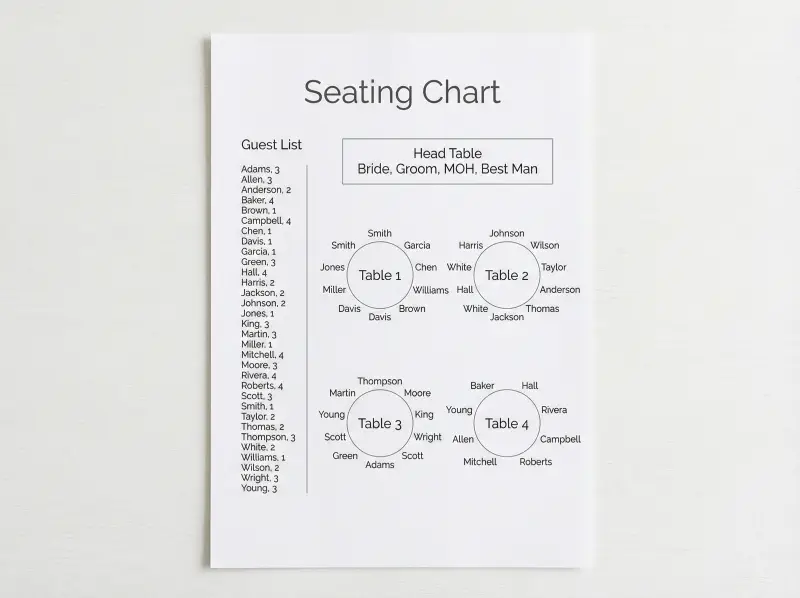
This wedding seating chart printable gives you a visual layout of your reception tables with space to write guest names at each seat or table. Print on U.S. Letter paper in landscape orientation to fit the room diagram. Many couples use it with their guest list—assign tables on the chart, then update the guest list with table numbers. The chart helps you balance family, friends, and personalities so everyone has a good seat.
Preview & Download
Print Settings
- Paper: U.S. Letter (8.5" × 11")
- Orientation: landscape
- Scale: 100%
- Margins: Default (0.5")
- 💡 Print landscape to fit the table layout. Consider a larger format if your venue has many tables.
What’s on this seating chart
This wedding seating chart printable gives you a visual layout of your reception tables with space to write guest names. Print in landscape to fit the room diagram. Here’s how to use it.
The chart includes table shapes, table numbers, and space for guest names per table. Use it with your guest list—assign tables here, then update the list with table numbers for escort cards.
How to use this seating chart — 3 real scenarios
Scenario 1: Couple with family dynamics to balance
You have divorced parents or relatives who don’t get along. The chart becomes a diplomacy tool. Place Dad’s family at Table 2, Mom’s at Table 4, with a buffer in between. Seat dancers near the DJ, older relatives farther from speakers. The printable lets you experiment—move names, redraw, try again. Many couples do a first draft, sleep on it, and revise.
Scenario 2: Couple with a mix of table sizes
Your venue has rounds of 8 and 10, plus rectangular 6-tops. Map which tables go where—rounds near the dance floor, rectangles along the sides. Assign guests to fill each: Table 1 (round, 10) gets bride’s family, Table 2 (round, 8) gets groom’s cousins. Balance party sizes so no table feels empty or overcrowded.
Scenario 3: Couple creating escort cards or a display board
Once the chart is final, transfer to escort cards or a display board. The printable is your source of truth. Use it day-of to answer “Where do I sit?” Some couples laminate a copy and keep it at the entrance with the coordinator.
Example fill-out
Head Table—Bride, Groom, MOH, Best Man (4). Table 1 (Round, 8)—John & Jane Smith, Maria Garcia, Sarah & Tom Jones, Mike & Lisa Chen. Table 2 (Round, 8)—Williams family (4), Martinez family (4). Table 3 (Round, 10)—Bride’s aunts/uncles (6), cousins (4). Table 4 (Rectangular, 6)—Groom’s college friends (6). Notes: Table 1 near dance floor; Table 3 farther from speakers; head table centered.
Common mistakes (and how to fix them)
-
Seating divorced parents at the same table. Give them separate tables. Check sight lines—can they see you without staring at each other?
-
Putting all singles at one table. Mix singles with couples they know or friendly extroverts. Every table needs at least one conversation starter.
-
Forgetting the head table. Count seats for you, partner, and wedding party first. Then fill the rest.
-
Not leaving buffer for no-shows. A few people won’t make it. Don’t over-optimize for exactly 8 per table.
-
Ignoring venue constraints. Confirm layout, table sizes, and fire code with the venue before finalizing.
Customization tips
Different table shapes: Redraw for squares, hexagons, or your venue’s layout. The principle is the same.
Escort board version: Blow up the chart and post it at the entrance. Guests find their name and table. Works for smaller weddings (under 80).
Meal indicators: Add C/F/V next to names if the caterer needs seat-by-seat meal delivery. The chart becomes your catering map.
Printing Tips
- Print on U.S. Letter (8.5" × 11") in landscape orientation
- Scale: 100% (do not use "Fit to Page")
- Margins: Default (0.5")
- 💡 Print landscape to fit the table layout. Consider a larger format if your venue has many tables.
Next step in your wedding workflow:
Related Templates You Might Need
Most people use 2–3 of these together:
- •
- •
Helpful Guides
- •
Frequently Asked Questions
When should I create the seating chart?
After RSVPs are in and you have your final head count—typically 2–3 weeks before the wedding. You need to know who's coming before you can assign seats. Some caterers need the chart earlier for plated meals; check their deadline.
Do I need seat assignments or just table assignments?
For buffet or family-style dinners, table assignment is usually enough. For plated meals, the caterer often needs seat-by-seat assignments so servers know who gets chicken vs. fish. Check with your venue.
How do I handle divorced parents?
Give them separate tables. Consider sight lines—can they see you without staring at each other? Place them on opposite sides of the room or with buffers (other tables) between. The chart helps you visualize before committing.
What if someone RSVPs late after I've finalized the chart?
Add them to an existing table with space, or create a small overflow table. Update the chart and your escort cards/board. Give the new assignment to your coordinator so they're not surprised day-of.
Should I use table numbers or names?
Table numbers (1, 2, 3) are standard and easy for staff. Table names (Oak, Maple, Beach) add personality but require a key or map. Both work—choose based on your style and venue.