Wedding Guest List Printable
One-Minute Summary
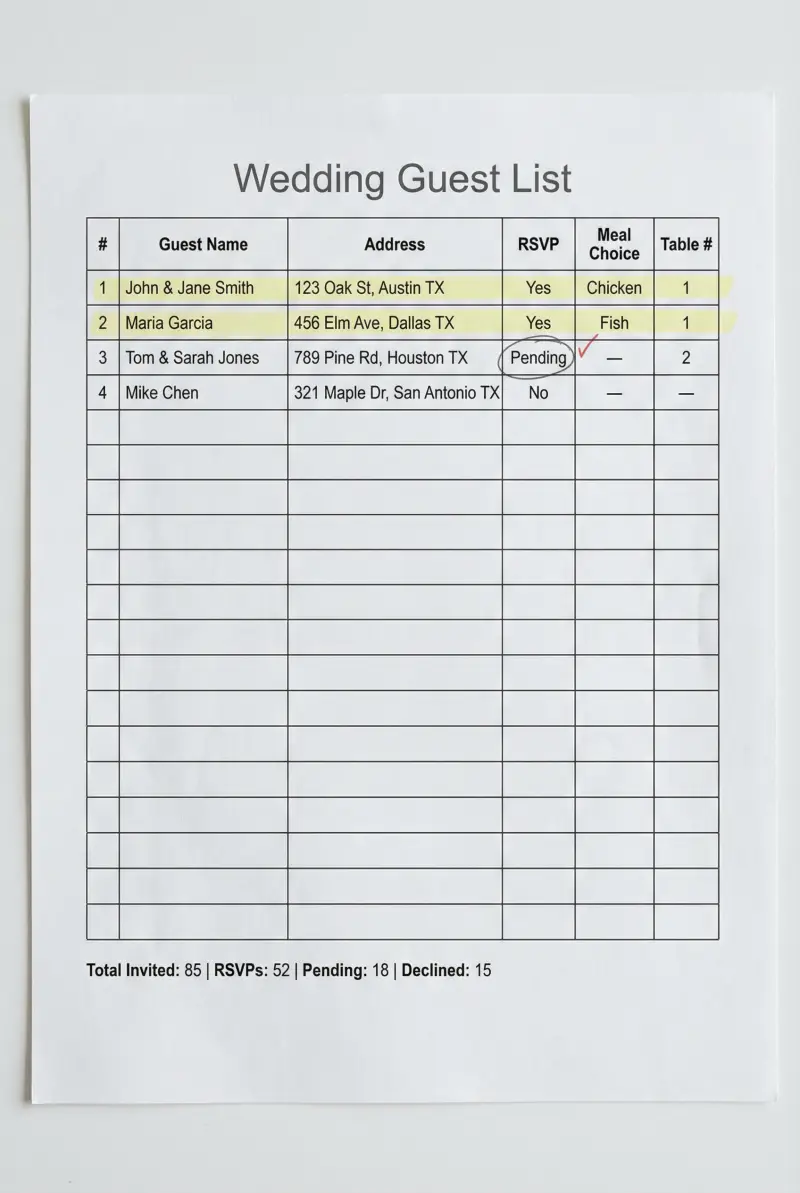
This wedding guest list printable gives you one place to track names, addresses, RSVP status, meal choice, and table assignment. Print on U.S. Letter paper and update it as responses come in. Many couples use it to chase down late RSVPs, confirm head counts with the caterer, and plan the seating chart—all from a single sheet that stays in your planning binder.
Preview & Download
Print Settings
- Paper: U.S. Letter (8.5" × 11")
- Orientation: portrait
- Scale: 100%
- Margins: Default (0.5")
What’s on this wedding guest list
This wedding guest list printable tracks names, addresses, RSVP status, meal choice, and table number. One sheet, updated as you go. Here’s how each column works.
The layout uses portrait orientation—print and keep it in your planning binder. Update it every time an RSVP arrives or you assign a table.
How to use this guest list — 3 real scenarios
Scenario 1: Couple sending invitations and tracking RSVPs
You’ve mailed invitations with an RSVP deadline 4 weeks before the wedding. As responses come in, update the list—Yes or No, meal choice for yeses. As the deadline approaches, you see who’s still Pending. Send a friendly follow-up. The printable keeps you organized so no one slips through. When the caterer calls for final numbers, you have them ready.
Scenario 2: Couple managing a blended guest list with family input
You and your partner each have lists from families plus your own friends. Combine them on the printable—add a “list” column (Bride, Groom, Bride’s family, Groom’s family) if needed. When you need to cut, you see the full picture. The address column helps when parents send invitations. Shared visibility reduces “Did we add Uncle Bob?” confusion.
Scenario 3: Couple planning seating from the guest list
RSVPs are in. Print a fresh copy with only Yes responses. Group by table—Table 1: Smith family, Table 2: college friends—and write the table number in the table column. The printable becomes your master list for place cards and escort cards. Day-of, if someone asks “Where’s Table 7?”, you can look it up.
Example fill-out
John & Jane Smith—123 Oak St | RSVP: Yes (3/15) | Meal: Chicken, Chicken, Kid’s | Table 3. Maria Garcia—456 Elm Ave | RSVP: Yes (3/12) | Meal: Vegetarian | Table 5. The Williams Family—789 Pine Rd | RSVP: Pending | Meal: — | Table —. Mike Chen—321 Maple Dr | RSVP: No (3/18). Sarah & Tom Jones—654 Birch Ln | RSVP: Yes (3/20) | Meal: Fish, Chicken | Table 2.
Common mistakes (and how to fix them)
-
Not leaving space for +1s and kids. Add a party size or count column. The caterer needs accurate numbers.
-
Forgetting who invited whom. Add a “list” or “side” column if family input matters for seating or thank-yous.
-
Waiting until the last minute to chase RSVPs. Follow up 2–3 days after the deadline. The printable shows who’s pending.
-
Not confirming meal choices before sending to caterer. Go through each Yes, confirm the meal, send the breakdown. Don’t guess.
-
Losing the list before thank-you cards. Keep it safe. You’ll need addresses again. Scan or photograph for backup.
Customization tips
Google Sheets: Same columns, add filters for Pending, Yes, or by table. Sort by table when building place cards. Share with partner and parents.
Extra columns: Add “relationship,” “song request,” or “dietary restrictions” if your venue needs it.
Backup: Photograph or scan the final list. Give a copy to your coordinator or venue. If the physical copy is lost, you have a reference.
Printing Tips
- Print on U.S. Letter (8.5" × 11") in portrait orientation
- Scale: 100% (do not use "Fit to Page")
- Margins: Default (0.5")
Next step in your wedding workflow:
Related Templates You Might Need
Most people use 2–3 of these together:
- •
- •
Helpful Guides
- •
Frequently Asked Questions
When should I send the guest list to the caterer?
Most caterers need final head count 1–2 weeks before the wedding. Use your RSVP deadline to ensure you have time to chase stragglers, confirm meals, and send the breakdown. Build in 3–5 days between RSVP deadline and caterer deadline.
How do I handle plus-ones and children?
Add a 'party size' or 'count' column. When a guest RSVPs with a +1 or kids, update the count. Some couples use 'John & Jane Smith (2)' or 'The Martinez Family (4)' to track. The caterer needs accurate numbers.
What if someone RSVPs after the deadline?
Check with your caterer—many can accommodate a few late adds for a fee. Update the guest list and meal choices, and add them to your seating chart. Document the change so there's no confusion day-of.
Should I include addresses for everyone?
Yes. You need them for invitations and thank-you cards. Even if you send digital invites, physical thank-yous are standard—and you'll need addresses for those. Keep the list; you'll use it again.
How do I assign table numbers?
Build your seating chart first—group guests by table. Then go back to the guest list and write the table number in each row. The list becomes your master reference for place cards, escort cards, and day-of coordination.
Should I add columns for accommodation or travel if guests are traveling?
If many guests are coming from out of town, add a column for 'accommodation status' or 'travel notes.' This helps you track who needs hotel block info and who's arranging their own stays. The Google Sheets version makes adding columns easier.