Grocery List Printable
One-Minute Summary
This grocery list printable is organized by store section — produce, dairy & eggs, protein & meat, pantry & grains, frozen, and household items. Instead of writing a random list and zigzagging through the store, you fill in items where they'll actually be found. There's a quantity column and a checkbox for each item. Print on U.S. Letter paper, fold it in half, and take it shopping. One pass through the store, nothing forgotten.
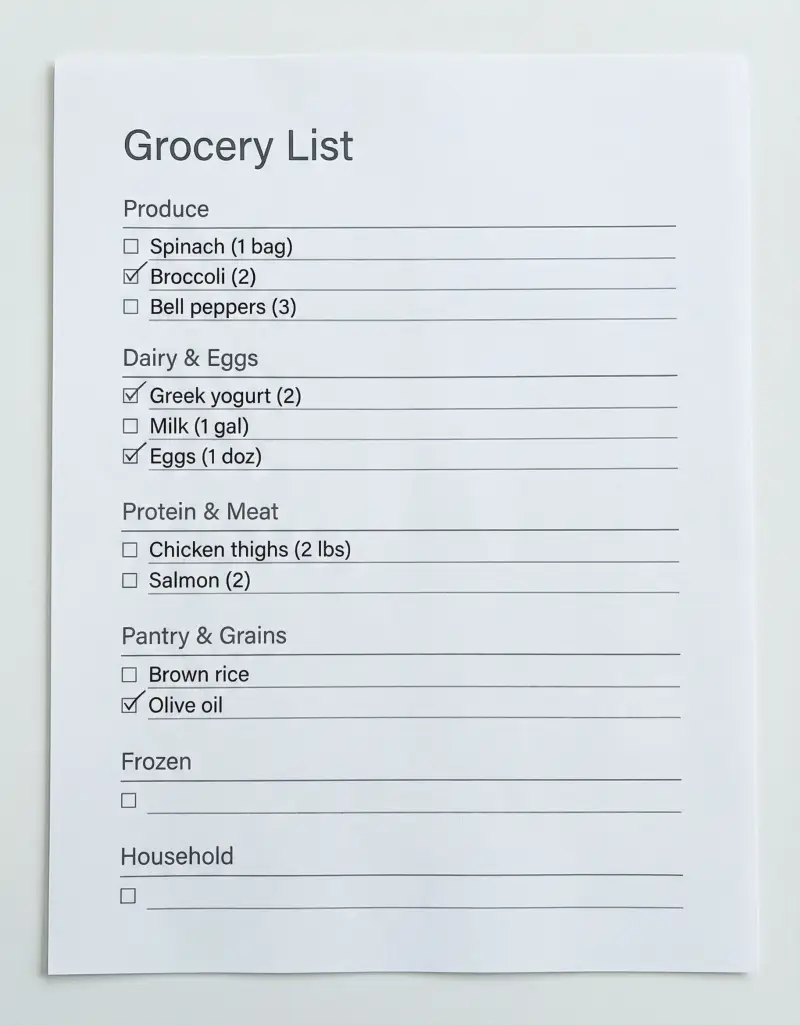
Preview & Download
Print Settings
- Paper: U.S. Letter (8.5" × 11")
- Orientation: portrait
- Scale: 100%
- Margins: Default (0.5")
- 💡 Print portrait, fold in half lengthwise for easy one-handed shopping.
What’s on this grocery list
This isn’t a blank notepad — it’s a structured shopping tool organized by the 6 most common sections in a U.S. grocery store. Here’s each section and why it’s there.
How to use this grocery list — 3 real scenarios
Scenario 1: Post-meal-planning shopping trip
You’ve just filled out the Weekly Meal Planner for Monday through Friday. Go meal by meal and transfer each ingredient to the correct section on this list. Chicken thighs → Protein & Meat. Broccoli → Produce. Rice → Pantry. By the time you’ve gone through all 5 days, you have a complete, organized list. At the store, work through each section from top to bottom. One pass. Nothing forgotten. Home in 35 minutes.
Scenario 2: Quick midweek restock
It’s Wednesday evening. You need a few things to get through the weekend. Instead of winging it (and coming home with chips but no actual dinner ingredients), check the fridge, scan the pantry, and fill in only the sections you need. Maybe 8 items across Produce, Protein, and Dairy. The focused list means a 15-minute store visit instead of an aimless 40-minute wander.
Scenario 3: Budget-conscious family shop
Your household agreed on a $100 weekly grocery budget. As you write each item, estimate its price in the margin. Tally the total before you leave the house. If you’re at $95 before adding snacks, you know to prioritize essentials and skip the premium ice cream this week. At the store, the organized sections help you stay focused and avoid impulse detours into aisles you don’t need.
Example fill-out
A realistic list for a week of meals for two adults:
Produce: Spinach (1 bag) · Broccoli (2 crowns) · Bell peppers, mixed (3) · Yellow onions (2) · Bananas (1 bunch) · Apples, Gala (6) · Lemons (2)
Dairy & Eggs: Greek yogurt, plain, 32oz (2) · Whole milk, 1 gal (1) · Shredded mozzarella (1 bag) · Eggs, large (1 dozen)
Protein & Meat: Chicken thighs, boneless (2 lbs) · Ground turkey, lean (1 lb) · Salmon fillets (2) · Black beans, canned (2 cans)
Pantry & Grains: Brown rice, 2lb bag (1) · Whole wheat wraps (1 pack) · Olive oil — check supply first · Diced tomatoes, canned (2)
Frozen: Mixed vegetables, steam bag (1) · Frozen blueberries (1 bag)
Household: Paper towels (1 roll) · Dish soap (1)
Total: 27 items. Estimated time at store: 30 minutes.
Common mistakes
-
Writing items randomly without sections. You end up crisscrossing the store. Section-organized lists cut average shopping time by 15–20 minutes.
-
Forgetting to check what you already have. Two minutes scanning the pantry and fridge prevents buying duplicates. Pair this with our Pantry Inventory printable for a permanent solution.
-
No quantities. “Chicken” is vague. “2 lbs chicken thighs” is actionable. Without quantities, you’ll overbuy or underestimate.
-
Shopping hungry. Not a list problem — a you problem. Eat a snack before you go, or your organized list gains 15 unplanned items.
-
Not bringing a pen. The checkboxes don’t work without something to check them off with.
Printing Tips
- Print on U.S. Letter (8.5" × 11") in portrait orientation
- Scale: 100% (do not use "Fit to Page")
- Margins: Default (0.5")
- 💡 Print portrait, fold in half lengthwise for easy one-handed shopping.
Available Variants
We've created specialized versions for specific needs:
- →Grocery List by Store Section — Enhanced section headers matching common U.S. store layouts
- →Budget Grocery List — Adds price column and running total for budget tracking
Next step in your meal prep workflow:
Related Templates You Might Need
Most people use 2–3 of these together:
- •
- •
- •
Helpful Guides
- •
- •
Frequently Asked Questions
Can I reuse this list every week?
Laminate it and use a dry-erase marker for items that change weekly. Or keep a 'staples' version with recurring items pre-printed (the Google Sheets version makes this easy) and just add weekly-specific items.
What if my store has a different layout?
The 6 sections cover most U.S. grocery stores. If your store puts items in a different order, simply fill in the sections in your store's walking order. The Google Sheets version lets you reorder sections with drag-and-drop.
How is this different from the budget grocery list variant?
This is the standard version with sections and quantities. The budget variant adds a price-per-item column and a running total at the bottom for tracking your spending in real time at the store.
Should I write brand names on the list?
Only if you have a strong preference. For most items, writing the generic name ('Greek yogurt, plain, 32oz') is more useful than a brand name — it lets you grab whatever's cheapest or available.
How many items fit on one page?
The standard layout comfortably fits 50–60 items across all sections. For larger families or monthly stock-up trips, print two copies or use the Google Sheets version with more rows.
Can I use this for online grocery ordering?
Yes. Fill out the list at home, then use it as a reference while adding items to your Instacart, Walmart, or store pickup order. The section organization makes it easy to find items in any store's online interface.