ATS Resume Template Printable
One-Minute Summary
This printable ATS resume template uses a clean, simple layout that many applicant tracking systems can read. Sections: header/contact, summary, experience, education, skills. No complex formatting, tables, or graphics that can break parsing. Print on U.S. Letter paper or use as a reference for a digital version. These are formatting and organization tools — they do not guarantee job outcomes. Many hiring managers look for clear, professional layouts.
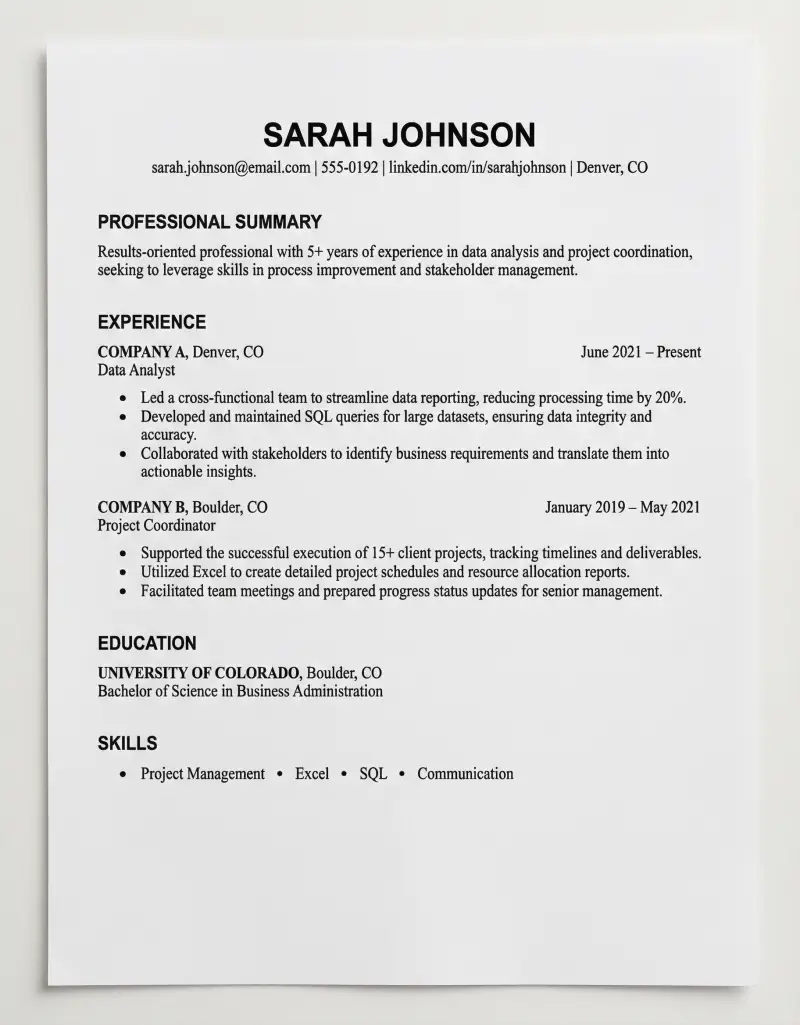
Preview & Download
Print Settings
- Paper: U.S. Letter (8.5" × 11")
- Orientation: portrait
- Scale: 100%
- Margins: Default (0.5")
- 💡 Use as reference for digital version. Print for in-person interviews or networking.
What’s on this resume template
Clean, ATS-friendly layout. Header, summary, experience, education, skills. Simple formatting. Many hiring managers look for this structure. These are organization tools — they do not guarantee job outcomes.
How to use this template — 3 real scenarios
Scenario 1: New grad
Lead with education, then internships. Summary targets entry-level. Skills from coursework. Clean layout.
Scenario 2: Career changer
Summary reframes transferable skills. Experience emphasizes relevant achievements. Template keeps focus on relevance.
Scenario 3: Experienced professional
Summary highlights seniority. Experience last 10-15 years. Skills reflect current tools. Accomplishments stand out.
Example fill-out
Header with contact. 2-4 sentence summary. Experience with quantified bullets. Education. Skills matching the role.
Common mistakes (and how to fix them)
- Tables, text boxes, columns. Use simple one-column. Many ATS systems struggle with complex layouts.
- Wrong file format. Follow instructions. PDF when no preference.
- Keyword stuffing. Match where honest. Don’t manipulate.
- Inconsistent formatting. Clean and uniform.
- Irrelevant experience. Tailor. One page for under 10 years.
Customization tips
Tailor for each role. Adjust section order to your situation. One page for under 10 years of experience. Export from Google Docs or Word as PDF.
Printing Tips
- Print on U.S. Letter (8.5" × 11") in portrait orientation
- Scale: 100% (do not use "Fit to Page")
- Margins: Default (0.5")
- 💡 Use as reference for digital version. Print for in-person interviews or networking.
Next step in your meal prep workflow:
Related Templates You Might Need
Most people use 2–3 of these together:
- •
- •
Helpful Guides
- •
Frequently Asked Questions
What makes a resume ATS-friendly?
Simple layout, standard headings (Experience, Education, Skills), no tables or graphics, consistent formatting. Many systems parse text — complex layouts can break. Clean structure helps. This template follows common guidelines.
Should I use a PDF or Word document?
Follow the employer's instructions. If no preference, PDF often preserves formatting. Some older systems prefer .doc. When in doubt, PDF is a common default. Have both versions ready.
How long should my resume be?
One page for under 10 years experience. Two pages if you have substantial relevant experience. Don't pad. Quality over length. Many hiring managers skim quickly — make every line count.
Should I include a photo?
In the U.S., photos are typically not included. Can introduce bias. Skip unless explicitly requested (rare for U.S. roles).
How do I handle employment gaps?
Use years only (2020–2022) if it helps. Address in a cover letter if relevant. Focus on what you did — volunteer, freelance, courses — during gaps. Be honest. Many hiring managers understand career breaks.
Can this template guarantee I get hired?
No. This is a formatting and organization tool. Many hiring managers look for clear, professional layouts — but hiring depends on fit, experience, interview performance, and many other factors. Use the template to present yourself clearly.